
Google Forms add-on
Choice Eliminator for Google Forms™
Set individual response limits per choice, manage time slots for appointment scheduling, hide full options, accept payments with Stripe, and automate form resets with the ultimate Choice Eliminator and Form Limiter for Google Forms™.
Feature focus
Form Choice & Option Limiter
Use Choice Eliminator for appointment scheduling, time slots, class sign-ups, event registration, volunteer shifts, lunch orders, and booking systems.
- Limit multiple choice, checkbox, dropdown, multiple choice grid, checkbox grid, and image choices.
- Show filled options as red strikethrough choices or hide them from the live form completely.
- Apply the same limit to every choice in a question with the bulk limit shortcut.
- View limit and response counts so admins know which choices are still available.
- Edit submitted responses, delete records, and send edit-response URLs from Response Manager.
- Add Stripe checkout settings when your form needs payment before registration is complete.
- Schedule response cleanup and restore choices for recurring surveys or repeated booking cycles.
- Use reset warnings and progress screens when old responses need to be backed up, cleared, and restarted.
- Notify admins by email when a choice reaches its limit.
- Require sign-in, limit one response per user, send responder copies, and show counts when needed.
- Close the form when all choices are full and show custom closed-form or validation messages.
- Allow external sharing for trusted domains when controlled access needs to work outside your own account.
Main advantages
More Control Than a Whole-Form Limiter
Choice Eliminator combines limit control, visual feedback for filled options, payment workflows, and response cleanup tools in one admin-friendly add-on.
Limit more question types
Use limits across standard choices, dropdowns, checkboxes, grid questions, and image-based choices so one add-on can handle different form layouts.
Show unavailable choices clearly
Show filled choices with strikethrough to make unavailable options clear, or hide choices completely when you want the live form to stay short.
Fix submitted responses
Response Manager helps admins review submissions, correct records, remove outdated responses, and send edit links when respondents need to update their answers.
Support paid registrations
Connect Stripe payment settings when registrations, classes, or product-style forms need checkout before the response is finalized.
Stripe payment workflows
Stripe Checkout for Paid Events & Appointments
Choice Eliminator can support Stripe payment setup for forms that sell seats, collect fees, or require checkout before a limited option is confirmed. This is useful for paid events, classes, service appointments, and small product-style order forms.
Product tour
Product Tour & Form Scheduler
These screenshots show the actual controls admins use to set limits, restore choices, restart forms, configure payments, and decide what respondents see when options fill up.
See removed choices clearly
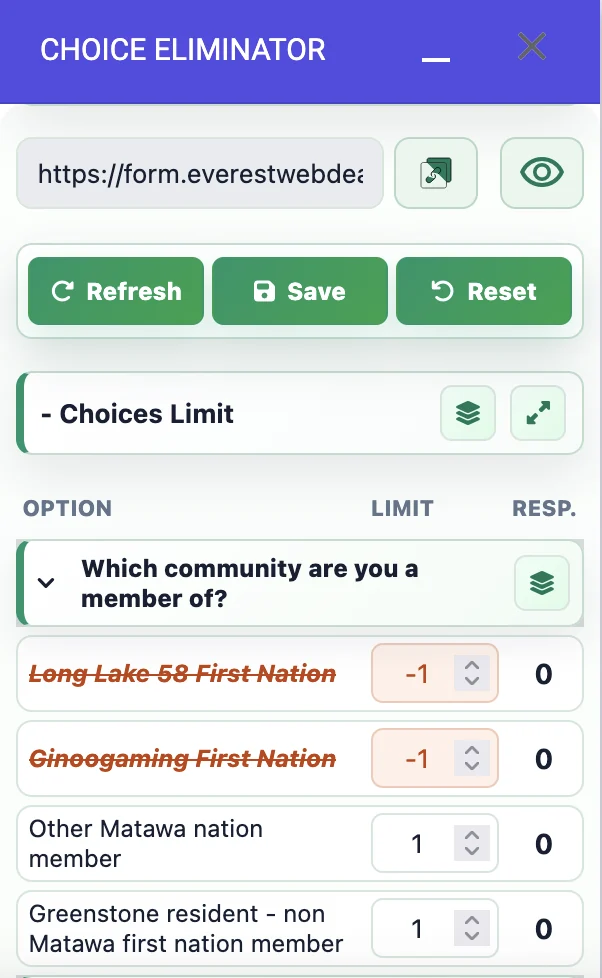
Set a limit for each choice and the add-on removes options after responses reach that limit. Removed choices are moved below active options in the add-on, shown in red strikethrough, and remain editable. Increase the limit above the received response count, save, and the choice can be restored.
Limit grid question options
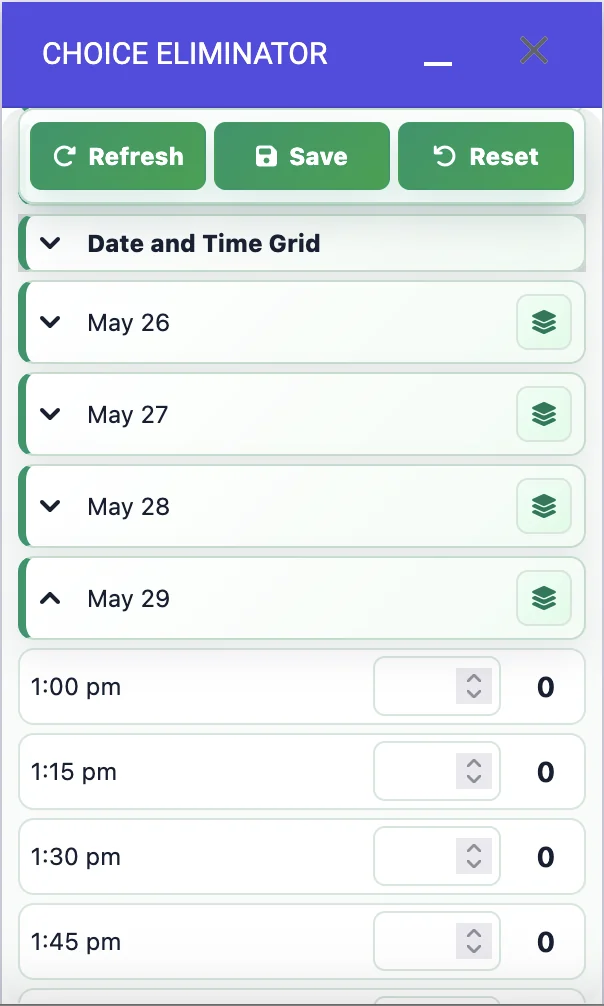
Multiple choice grid and checkbox grid questions can be managed row by row, which is useful for appointment dates, time slots, class schedules, and other matrix-style forms.
Apply one limit to every choice
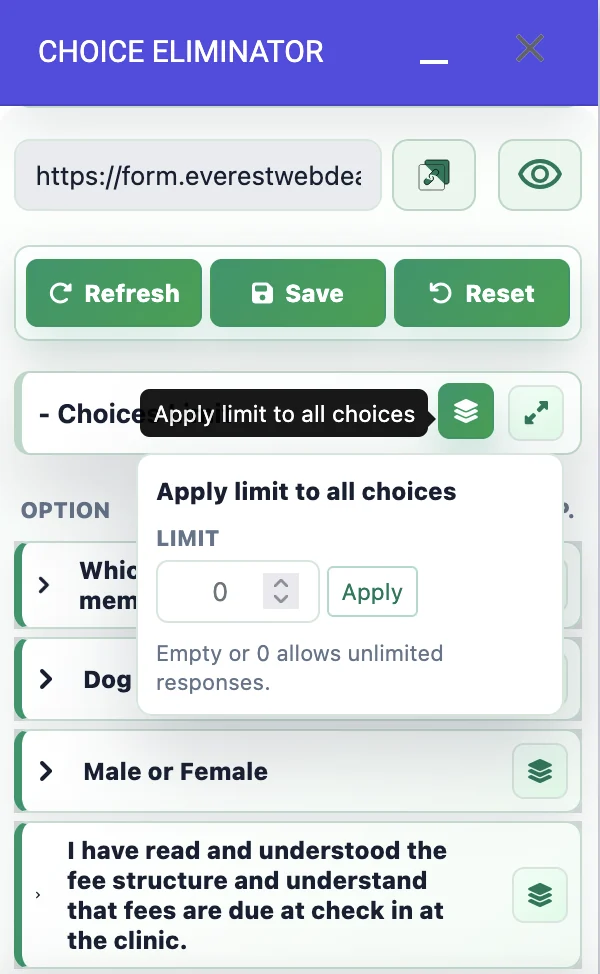
Use the bulk limit shortcut when every option has the same capacity. Enter the limit once, click Apply, and save the configuration instead of editing each choice one by one.
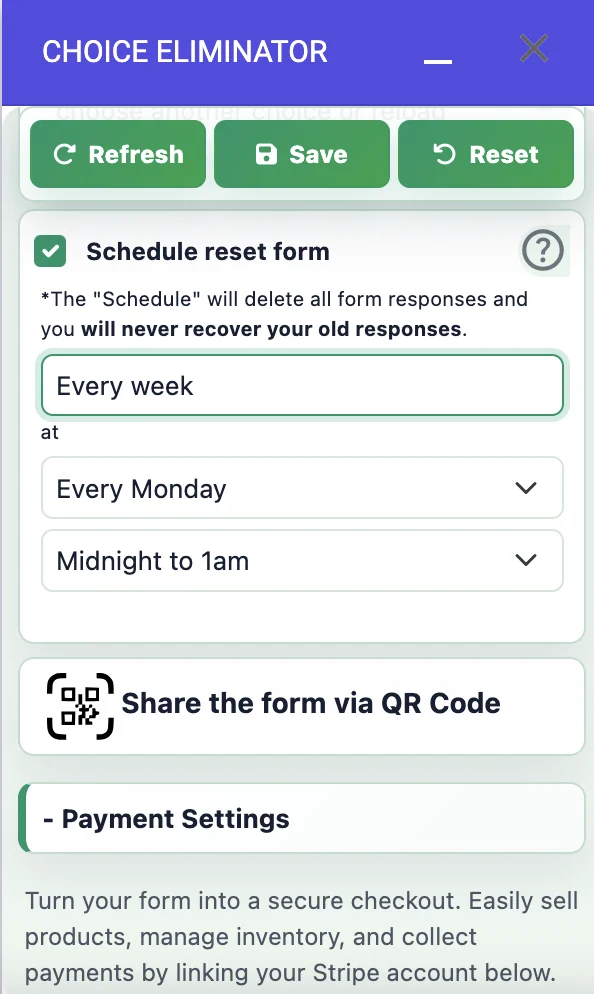
Schedule resets and restart surveys
Automatically remove old responses, restore deleted choices, and reuse the same form for hourly, daily, weekly, monthly, or date-based cycles.
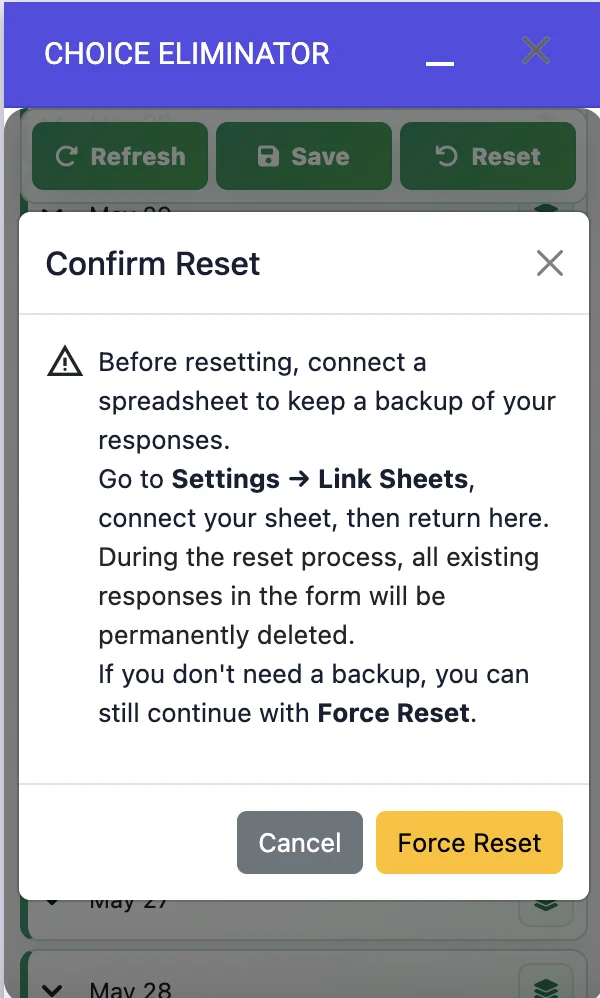
Reset with a safety warning
Before clearing responses, the add-on warns admins to connect a spreadsheet backup. When a backup is not needed, admins can still continue with Force Reset.
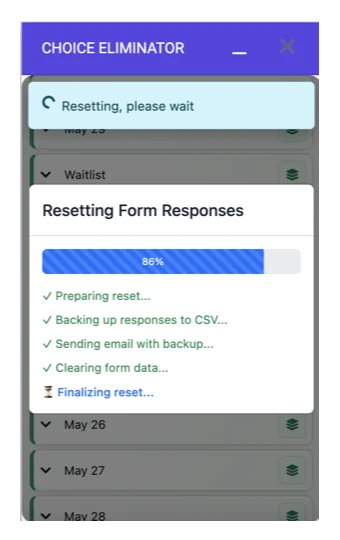
Track reset progress
The reset screen shows progress while the add-on prepares the reset, backs up responses, emails the backup, clears form data, and finalizes the restart.
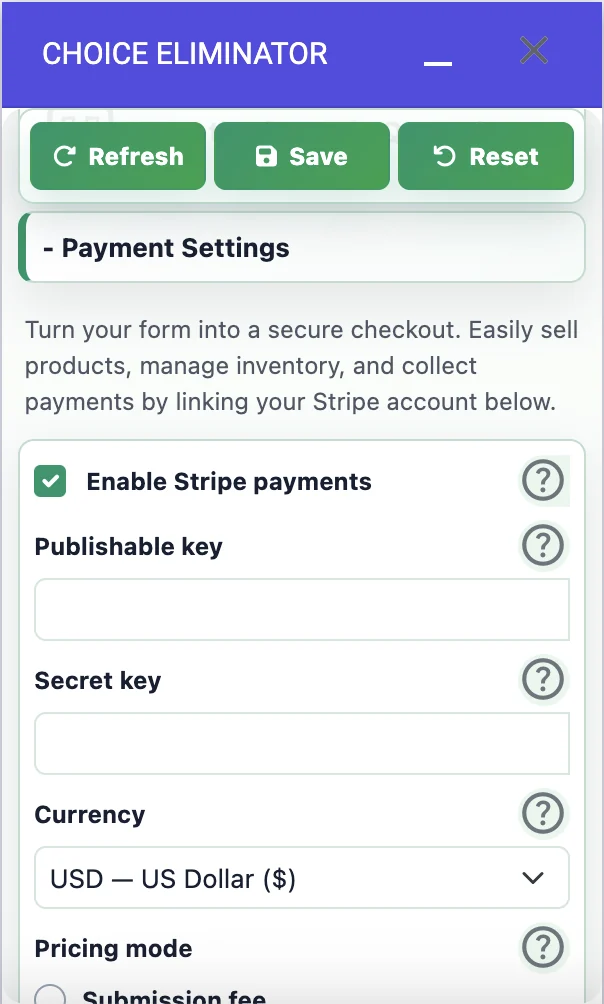
Turn a form into checkout
Enable Stripe payments, add your publishable and secret keys, choose currency, and connect a payment step to paid registrations or order forms.
Use alerts and response controls
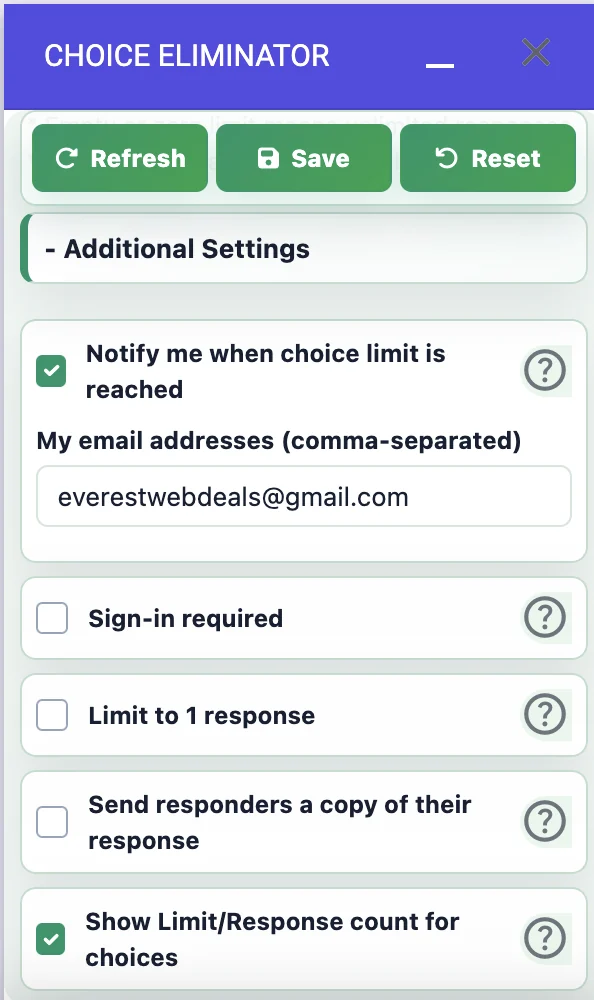
Notify admins when limits are reached, require sign-in, limit users to one response, send responder copies, and choose whether limits or response counts are visible.
Control limit-reached behavior
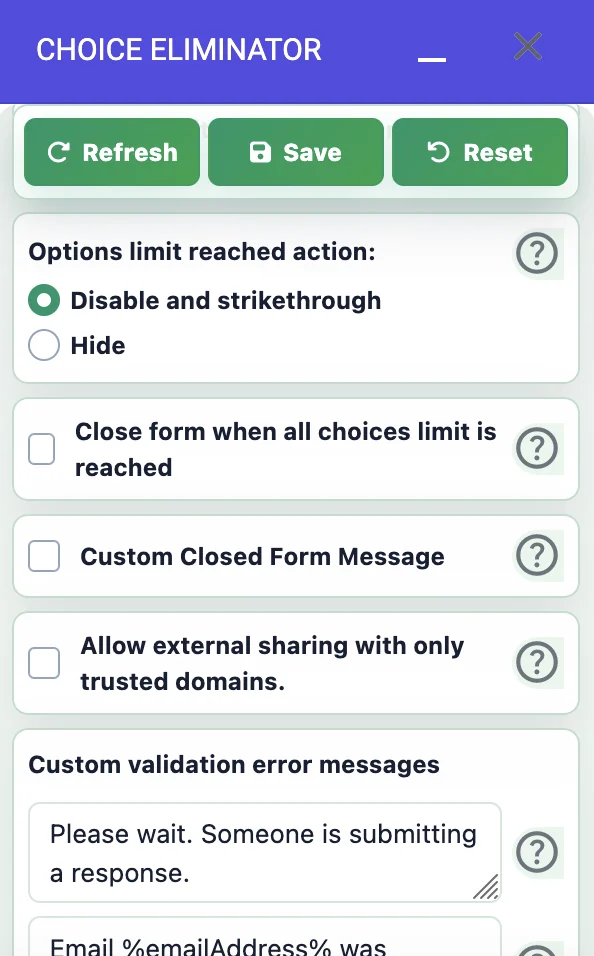
Choose whether filled options are disabled with strikethrough or hidden, close the form when every choice is full, write a custom closed-form message, allow trusted-domain sharing, and customize validation errors.
How it works
How Choice Eliminator Works (4 Simple Steps)
Install
Add Choice Eliminator from Google Workspace Marketplace and open it inside your Google Form.
Set limits
Choose the question, set limits for options, and decide whether filled choices should be hidden or shown with strikethrough.
Use custom preview URL
Share the add-on preview URL when respondents need the live controlled version of your form.
Maintain
Use Response Manager and scheduled resets to clean submissions and reopen choices for the next cycle.
Tutorials
Learn the add-on step by step
Use these guides and videos to set up limits, image choices, payments, and response management workflows.

Close the form when all limits are reached
Learn how the close-form setting stops additional submissions after every limited choice is filled.

Set up every Choice Eliminator feature
Follow a complete walkthrough of limits, unavailable-choice behavior, notifications, resets, and response tools.

Show limits and response counts
Display each choice's limit and current response count so admins can monitor remaining capacity.

Choice Eliminator overview
Get a practical introduction to limiting multiple-choice, checkbox, and dropdown options in Google Forms.

Limit multiple-choice and checkbox grids
Control section limits in multiple-choice grid and checkbox grid questions with Choice Eliminator.

Limit choices with images
Apply limits to image-based options so unavailable choices can be controlled directly in Google Forms.

Let users update responses
Show respondents how to update an existing submission so changes do not create duplicate records.

Add Stripe payments
Connect Stripe, set option prices, collect payments, and manage limited products or event spaces from Google Forms.
FAQ
Common questions
Which Google Forms question types can Choice Eliminator limit?
It is designed for multiple choice, checkbox, dropdown, multiple choice grid, checkbox grid, and image choice workflows.
Can filled choices be hidden instead of shown with strikethrough?
Yes. You can use strikethrough choices when you want users to see what is already unavailable, or hide unavailable options when you want the form to stay shorter.
Can I apply the same limit to many options quickly?
Yes. Use the bulk limit control to apply one limit to every choice in a question, then adjust individual choices only when needed.
Can the add-on restart a form automatically?
Yes. Scheduled reset workflows can remove old responses, restore choices, and prepare the same form for the next survey, event, or booking cycle.
Why does the add-on use a custom preview URL?
The custom preview URL lets the add-on control choice availability and show the current option state to respondents.
Can I collect payments?
Choice Eliminator can support Stripe payment setup for forms that require checkout as part of registration or order collection.
Can admins edit or delete submitted responses?
Yes. Response Manager helps admins review, edit, delete, and manage responses after submission, including workflows that require corrections or cleanup.
Can I reuse the form for recurring events?
Yes. Scheduled cleanup and restore workflows help remove old responses and reopen choices for the next event, class, or survey cycle.
Resources
Helpful links
Use these links to install the add-on, follow setup guides, view pricing, and check our policies.
Download Choice Eliminator
Install Choice Eliminator for Google Forms™ from Google Workspace Marketplace.
How to use Choice Eliminator
Follow the setup guide to start setting limits on your forms.
Choice Eliminator Pricing
Review the subscription licensing options and plans.
Choice Eliminator Privacy Policy
Review how your data is handled securely and privacy-first.
Choice Eliminator Terms
Read the product terms and conditions of use.
Security & Privacy Center
Learn more about COPPA & FERPA compliance and security controls.
How to Limit Responses in Google Forms
Step-by-step guide on restricting form submissions and managing response caps.
Troubleshooting & Setup
Instructions for properly setting up the form and troubleshooting common issues.
Our Other Google Workspace Add-ons
Ready to install
Let your Google Form stop accepting choices at the right time.
Set limits, save the add-on configuration, and use Choice Eliminator to control what respondents can select.