
GPT Plus Google Docs™
Use ChatGPT and OpenAI in Google Docs™ to summarize text, fix grammar and spelling, write emails or blog posts, change tone, add custom prompts, translate, create images with DALL E, and insert or copy AI responses without leaving your document.
Use GPT Plus Docs when writing needs a faster first draft or cleaner edit
Start with familiar document tasks: summarize an article, fix grammar, draft emails, write blog posts, create social media content, translate text, change tone, and prepare reports inside Google Docs™.
Summarize long documents
Condense selected text, articles, notes, or reports into shorter AI-generated summaries.
Fix grammar and spelling
Clean up document text before sharing it with students, clients, coworkers, or readers.
Write emails or blog posts
Turn ideas, proposals, or selected notes into a clearer first draft for business or content work.
Change tone
Adjust the same text for a professional, friendly, concise, or more polished document style.
Translate text
Use AI-powered translation when a document needs a quick language version or draft translation.
Create images from prompts
Use DALL E image generation from text descriptions when a document needs visual support.
Summaries, grammar, tone, custom prompts, translation, images, history, and model settings
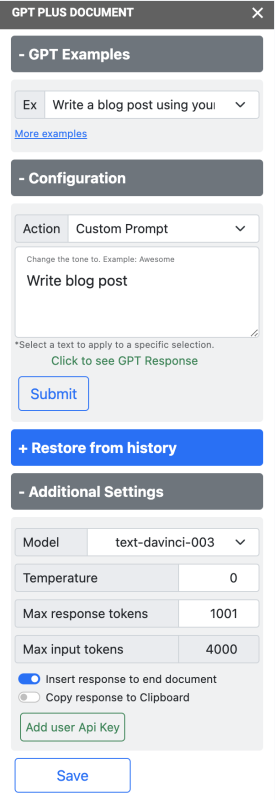
Use writing actions, prompt controls, OpenAI model selection, API key setup, response history, temperature, max tokens, insert response, and copy-to-clipboard tools inside Google Docs™. ChatGPT and OpenAI writing support, DALL E image generation, translation, and response handling stay in one document workflow.
Summarize selected text
Highlight document text and generate a concise summary for articles, reports, notes, or long drafts.
Fix grammar and spelling
Improve writing quality with AI grammar correction and spelling cleanup before you share the document.
Write emails, blogs, and reports
Create emails, blog posts, social media content, report sections, and other writing from your ideas.
Change the tone
Rewrite selected content for different audiences, contexts, and document styles.
Add your custom prompt
Use your own prompt to guide the AI response when the built-in actions are not specific enough.
Translate to languages
Translate selected document text with AI-powered tools while staying inside Google Docs™.
Select OpenAI GPT models
Use GPT 4o mini, GPT 4o, GPT 5, and DALL E options from the add-on settings.
Add user API key
Add your OpenAI API key and manage settings for temperature and max response tokens.
History and response handling
List action history, restore a response, insert the response at the end of the document, or copy it to the clipboard.
Show the Google Docs™ AI assistant before the setup steps
Preview the sidebar, writing actions, model controls, and response workflow before you install the add-on.
AI writing actions
Choose common actions such as summarize, grammar correction, tone, translation, and custom prompts.
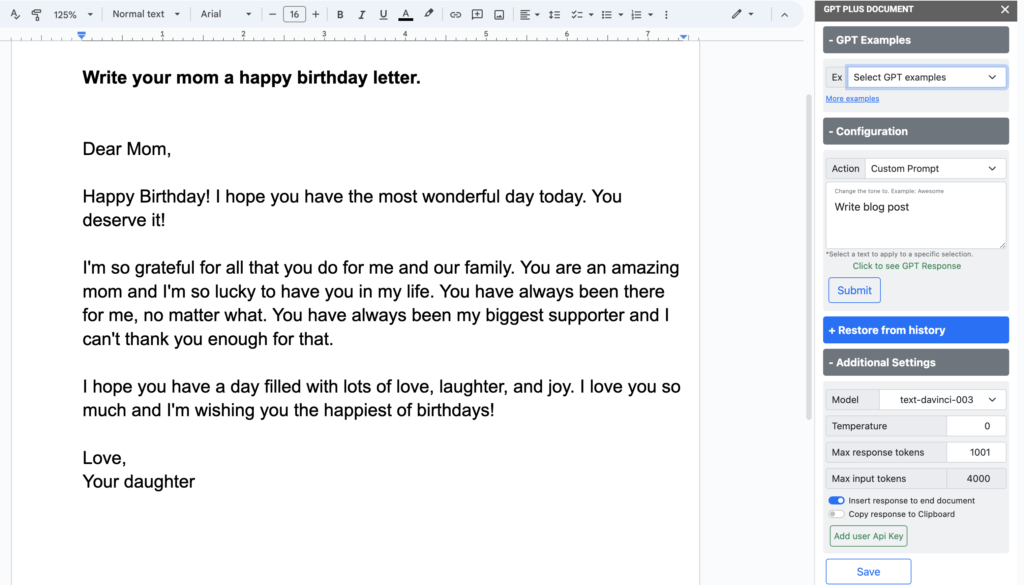
Response workflow
Review the AI response, then insert it into the document or copy it for another place.

Google Docs™ add-on
Keep AI writing help near the document instead of switching between multiple browser tabs.
Install GPT Plus Docs, open a Google Doc, choose an AI action, and insert the response
Keep setup clear for new users: install from Google Workspace Marketplace, open the add-on in Google Docs™, configure the API key and model settings when needed, then run the writing action.
Install from Marketplace
Open the Google Workspace Marketplace listing and install GPT plus Google Docs™, ChatGPT.
Open a Google Doc
Start from the document where you want to summarize, rewrite, translate, or generate content.
Launch the add-on
Use the Google Docs™ add-on menu to open GPT Plus Docs in the document sidebar.
Add API key and settings
Add your OpenAI API key when required, then choose model, temperature, and max response tokens.
Select text and action
Highlight the desired text and run summarize, fix grammar, tone, translate, custom prompt, or image generation.
Insert or copy response
Review the generated response, insert it at the end of the document, copy it, or restore a response from history.
Use ChatGPT and OpenAI inside Google Docs™
Watch how GPT Plus Docs helps create summaries, emails, reports, rewritten content, and AI-generated images without leaving the document workflow.
 Watch
Watch
Create summaries, emails, and reports
Use AI actions in Google Docs™ to summarize content and produce practical business or school writing.
 Watch
Watch
Use ChatGPT and AI image generation
Explore writing models and DALL E image creation from the GPT Plus Docs sidebar.
 Watch
Watch
GPT Plus Google Docs™ overview
See the complete add-on workflow for generating, reviewing, copying, and inserting AI responses.
Common GPT Plus Google Docs™ questions
Answer the practical install questions before someone leaves for Marketplace: Google Docs support, API key, model choices, image generation, history, and response handling.
Install link, setup guides, policy links, and related Google Workspace add-ons
Keep install, support, API key, word calculation, privacy, and related add-on paths easy to find after the main product story.
Download GPT Plus Docs
Install GPT plus Google Docs™, ChatGPT from Google Workspace Marketplace.
Setup GPT Plus Google Docs™
Open the existing setup guide for installing and starting the add-on.
How To Generate an OpenAI GPT-3 API Key
Follow the support guide when you need an OpenAI API key.
How to calculate Gpt words?
Link to the existing page that explains GPT word calculation for users.
AI Privacy-Policy
Open the existing Everest Web Deals AI privacy policy.
AI Terms and Conditions
Open the AI terms for GPT Plus Google Docs™ and related AI add-ons.
Our Other Google Workspace Add-ons
Ready to write faster inside Google Docs™?
Install GPT Plus Google Docs™, choose the AI action you need, select a GPT model or DALL E image option, and insert or copy the response from the document workflow.