
Form Field Range, Form Ranger
Populate Google Forms from Google Sheets with dynamic multiple choice, dropdown, and checkbox options. Form Field Range helps keep Google Forms™ choices updated from Sheet ranges, formulas, and scheduled refreshes so rosters, inventory, event lists, and sign-up options stay current.
Use Form Ranger when form options change in a spreadsheet
Use Form Field Range for student rosters, inventory lists, appointments, events, surveys, customer lists, and any Google Forms™ dropdown that should update from Google Sheets™.
Student and employee rosters
Populate class lists, staff names, attendance forms, and training registration choices from a Sheet column.
Inventory and product options
Auto update product, equipment, or inventory choices when availability changes in Google Sheets™.
Event registrations
Show current session names, event titles, locations, or available dates without editing the form each time.
Appointment and sign-up forms
Keep changing appointment slots and sign-up choices aligned with the source spreadsheet.
Customer or supplier lists
Refresh form questions from customer, supplier, or project lists managed by your team in Sheets.
Multiple forms from one source
Load values from a central Google Sheets™ data source into multiple Google Forms™ for consistency.
Dynamic form choices, Sheet formulas, scheduled refresh, and less manual editing
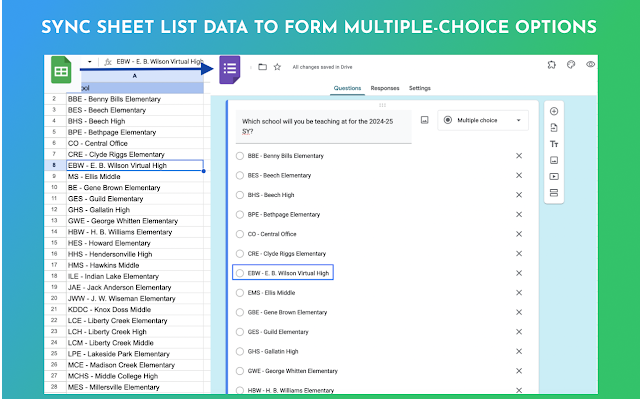
Form Field Range connects Google Forms™ questions to Google Sheets™ data, then updates multiple choice, dropdown, and checkbox options from the selected source.
Connect a Google Sheets™ range
Select the Sheet data source that should populate your Google Forms™ question choices.
Multiple choice, dropdown, checkbox
Use one add-on for common dynamic form choice fields instead of updating each option by hand.
Load data into form questions
Import values directly from your sheets to fill question options in Google Forms™.
Scheduled option refresh
Refresh form options hourly, daily, weekly, or monthly when the Sheet values change.
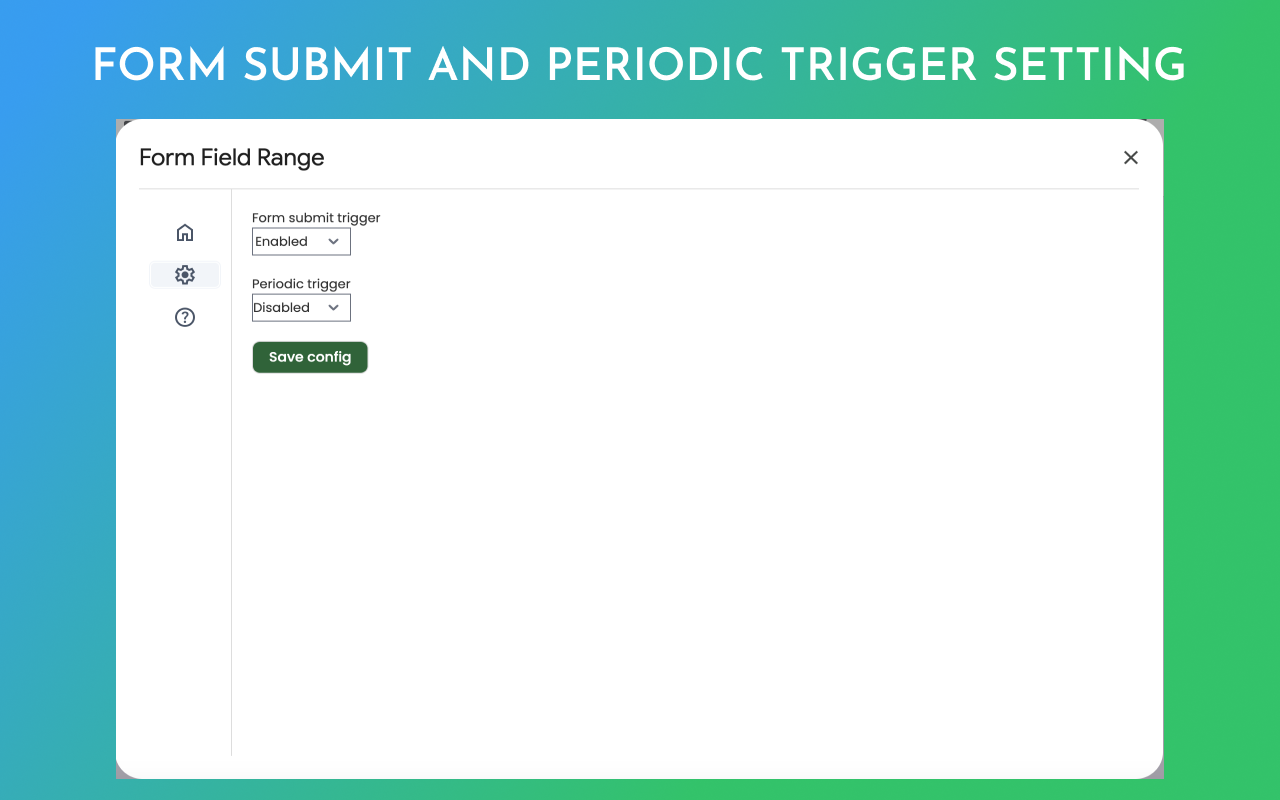
Refresh after form submission
Update fields after new submissions so choices can respond to availability, limits, or Sheet formulas.
Keep forms and Sheets aligned
Reduce duplicate edits by managing the source values once in Google Sheets™.
Use spreadsheet formulas
Use formulas such as COUNTIF, IF, VLOOKUP, and MATCH to filter or organize dynamic options.
Create or remove options
Add current values to form fields or remove choices based on your source data and workflow.
Update several forms
Run automatic updates for more than one Google Form™ when teams reuse the same Sheet source.
A clearer way to connect Sheets data to Google Forms choices
Preview the Form Ranger interface and see how connected Google Sheets™ data updates Google Forms™ choices.
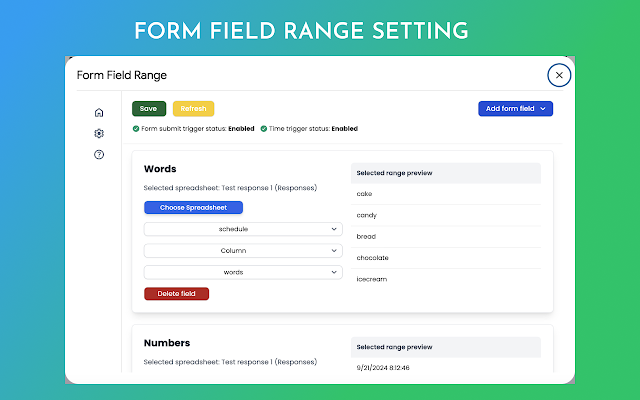
Choose the source data
Connect the question to values already managed in Google Sheets™.
Map choices to questions
Use Sheet columns to populate multiple choice, dropdown, or checkbox fields.
Refresh form options
Run updates on submission or schedule refreshes when the source Sheet changes.
Install Form Field Range, connect a Sheet range, and update Google Forms choices
Start in Google Forms™, connect a Google Sheets™ data source, choose update settings, and keep form choices current.
Open your Google Form
Start from the form that needs dynamic dropdown, multiple choice, or checkbox values.
Install Form Field Range
Use Google Workspace Marketplace to install Form Field Range, Dynamic form choice, Form Ranger.
Choose the target question
Select the form field that should receive options from Google Sheets™.
Select the Sheet range
Pick the spreadsheet, sheet, and column or range that contains the current option values.
Choose refresh behavior
Refresh on form submission or use a schedule such as hourly, daily, weekly, or monthly.
Save and test the form
Save the settings, refresh the options, and confirm the form displays the expected choices.
Connect Google Sheets™ data to Google Forms™
Follow the complete Form Ranger workflow for selecting a spreadsheet range, mapping it to a form question, and keeping dropdown, multiple choice, or checkbox options updated.
 Watch
Watch
How to use Form Ranger
Populate Google Forms™ options from Google Sheets™ and configure automatic refresh behavior.
Common Form Ranger questions
Answer the practical questions before someone installs: field types, Sheet updates, formulas, multiple forms, and pricing.
Install link, tutorial, policy pages, and related Google Workspace add-ons
Use these links to install the add-on, review support pages, open policy details, and explore related Google Workspace add-ons.
Download Form Field Range
Install Form Field Range, Dynamic form choice, Form Ranger from Google Workspace Marketplace.
Privacy Policy
Privacy policy for the Form Field Range Google Forms™ add-on.
Terms and Conditions
Terms and conditions for Form Field Range.
Populate Google Forms from Google Sheets
Read the supporting guide for using Sheets data in Google Forms™.
Form Field Limit
Use when a Google Forms™ field needs response or option limits instead of dynamic Sheet values.
Our Other Google Workspace Add-ons
More details about using Form Ranger with Google Sheets data
Learn how dynamic form choices, formulas, refresh timing, and central Sheet sources work together.
Populate form options without copy and paste
Form Field Range helps you populate Google Forms from Google Sheets by pulling current values into multiple choice, dropdown, and checkbox questions.
Use it when lists change often, such as student names, employee names, event sessions, inventory items, product options, appointment slots, supplier lists, customer lists, or survey choices.
The add-on can refresh values after form submission or on a scheduled basis, which helps keep form options current without asking someone to edit the form manually.
Works for common Form Ranger search needs
Use Form Field Range, Form Ranger, dynamic form choice, Google Forms dynamic dropdowns, Google Forms multiple choice from Sheets, and auto update Google Forms options in one workflow.
Populate Google Forms from Google Sheets, use dynamic fields in forms, connect a Sheet data source, schedule refreshes, and manage dropdown, checkbox, and multiple-choice options from a spreadsheet.
The same product name, Marketplace install route, tutorial route, policy pages, FAQ topics, and related add-on paths remain available so returning users can still find the information they expect.
Ready to populate Google Forms from Google Sheets?
Install Form Field Range, connect a Google Sheets™ range, map it to your Google Forms™ question, and keep dynamic form choices updated automatically.