
Form Field Limit
Form Field Limit helps you set limits for multiple choice options, checkbox options, and dropdowns in Google Forms™. Use it to set form field limits on responses, prevent data overload, and keep choice removal workflows easier to manage.
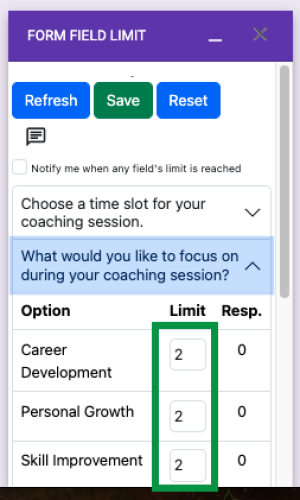
Use Form Field Limit when individual fields or options need their own response limit
Limit Google Forms™ fields, manage choice removal, prevent overbooking, and keep response counts visible while people submit the form.
Appointment scheduler forms
Limit how many people can select each appointment slot and reduce double-booking in Google Forms™.
Time slot registration
Create time slot registration forms for classes, meetings, interviews, workshops, and office hours.
Event planning forms
Set limits for sessions, rooms, resources, or attendee choices while keeping the form open.
Surveys with capped answers
Control response counts for specific Google Forms™ questions when only a limited number of answers should be accepted.
Choice-based questions
Set limits for multiple choice options, checkbox options, and dropdowns when each choice has a limited capacity.
Response cleanup
Search, view, edit, delete, and send edit response URLs from the Form Response Manager.
Field type limits, individual caps, response counts, email alerts, and response management
Set individual limits, leave limits empty for unlimited responses, see response counts, receive email notifications, and manage submitted responses.
Multiple choice options
Set response limits for multiple choice options in Google Forms™ when each individual choice has its own capacity.
Checkbox options
Limit selections for checkbox options when respondents can choose multiple choices with separate limits.
Dropdowns
Control response limits for dropdowns, automatically removing or disabling full options as choices fill up.
Set individual limits for each field
Give each multi choice option field its own limit so one full slot does not close the entire form.
Allow unlimited responses
Keep the limit empty for fields or options that should stay open without a response cap.
Show response counts
View accepted response counts for multi choice options and form fields from the add-on.
Email notification when the limit is reached
Receive an email notification when the response count reaches its configured limit.
Form Response Manager
Search, view, edit, and delete responses from the response manager when follow-up is needed.
Edit response URL support
Obtain the edit response URL and send it to the user when a submitted response needs correction.
Show the add-on setup, limit sidebar, sharing flow, and response count refresh
Preview the Form Field Limit workflow in a responsive carousel before you install the add-on.
Main limit sidebar
Configure field limits and review response counts from the add-on interface.
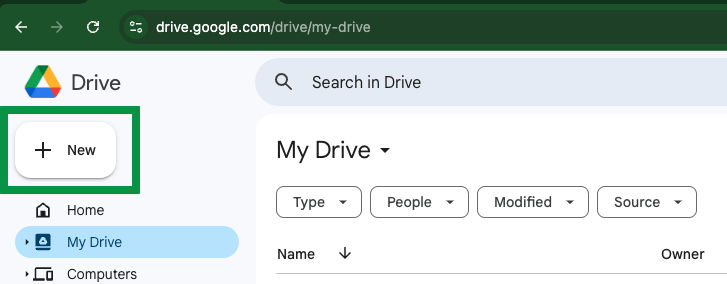
Time slot form example
Start from a form with appointment, meeting, class, or event slots.
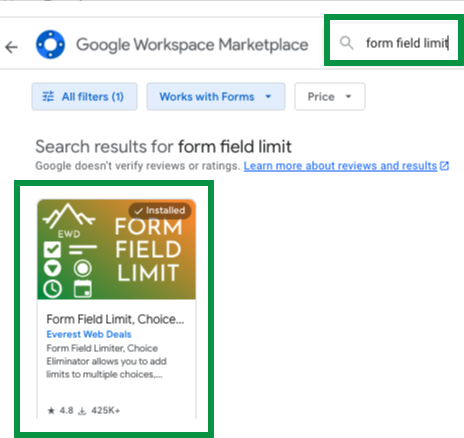
Search and install
Find Form Field Limit in Google Workspace Marketplace from Google Forms™.
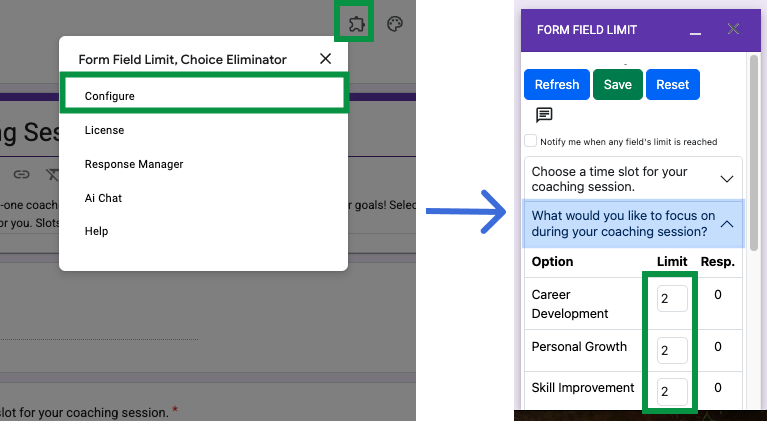
Set field limits
Add a limit for each slot or leave it empty for unlimited responses.
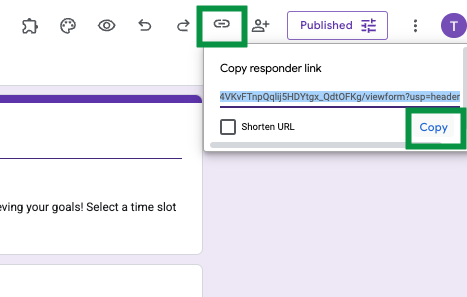
Share the form
Copy the responder link and share the limited form with students, clients, or attendees.
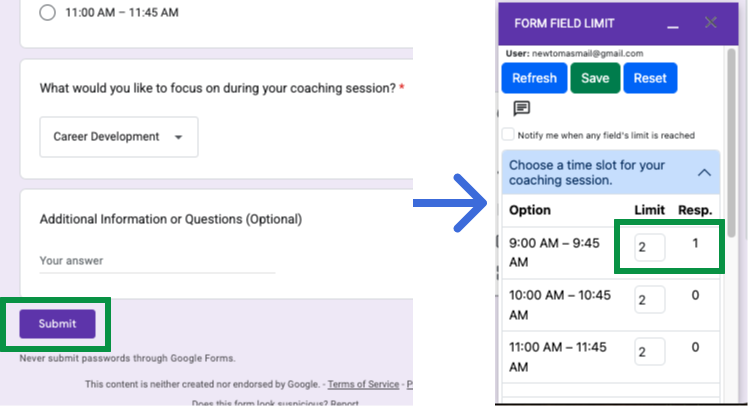
Refresh response counts
Return to the sidebar and refresh to see updated response counts after submissions.
Install Form Field Limit, choose the field, set limits, and test the response count
Install the add-on, choose the fields that need limits, set response rules, and keep the Marketplace route easy to reach.
Open or create your Google Form
Build the survey, appointment scheduler, event planning form, or sign-up form that needs field limits.
Install from Marketplace
Open Add-ons from Google Forms™ and install Form Field Limit from Google Workspace Marketplace.
Open the add-on
Use the puzzle piece icon and select Form Field Limit, Choice Eliminator from the menu.
Choose the question or field
Select the multiple choice options, checkbox options, or dropdowns that need limits.
Enter limits
Add a limit in the Limit column for each field or option. Leave a limit empty when unlimited responses are allowed.
Test and refresh
Submit a test response, return to the add-on, and refresh to confirm the response count updated correctly.
Set field limits and manage submitted responses
Learn how to limit individual Google Forms™ fields and use the latest response editing workflow when a submission needs to be updated.

Common Form Field Limit questions
Quick answers about setup, field limits, response counts, notifications, and response management.
Install link, setup guide, tutorial, subscription, and related Google Workspace add-ons
Use these links to install the add-on, follow setup instructions, edit responses, manage subscription details, and explore related Google Forms™ tools.
Download Form Field Limit
Install Form Field Limit, Choice Eliminator from Google Workspace Marketplace.
How to install Form Field Limit
Follow the setup guide for creating a time slot registration form with field limits.
Form Field Limit subscription
Review the subscription page for Form Field Limit.
Form Response Limit
Use when the whole Google Form™ needs a total response cap or start/stop schedule.
Our Other Google Workspace Add-ons
Search phrases kept in natural page copy
Learn how Form Field Limit supports field limits, choice limits, response counts, email notifications, and response management for Google Forms™.
Field limits for choice-based Google Forms™ questions
Use Form Field Limit to set limits for multiple choice options, checkbox options, and dropdowns.
Use the Google Forms Field Limit add-on to set form field limits on responses and help prevent data overload.
It also keeps choice removal, choice eliminator, form choice limiter, response counts, email notification, Form Response Manager, edit response URL, and Google Forms™ response-limit wording.
Booking, sign-up, and survey scenarios
Use the add-on for time slot registration forms, appointment scheduler forms, event planning forms, surveys, class sign-ups, workshops, client bookings, and limited resources.
Use it to avoid overbooking in time slot registration forms, appointment schedulers, event planning forms, choice eliminator workflows, and form choice limiter setups.
Install from Google Workspace Marketplace, follow the setup guide, review response editing help, and open subscription or FAQ details whenever you need them.
Ready to set field limits in Google Forms™?
Install Form Field Limit, set response limits for each field or option, monitor response counts, and use Form Response Manager when submissions need review.