
Form Quiz Timer for Google Forms™
A versatile timer for Google Forms™ quizzes, online tests, and time-limited surveys. Form Quiz Timer helps you set a time limit, schedule start and end times, limit attempts, show custom messages, share by QR code, and auto-close forms so tests and surveys stay controlled.
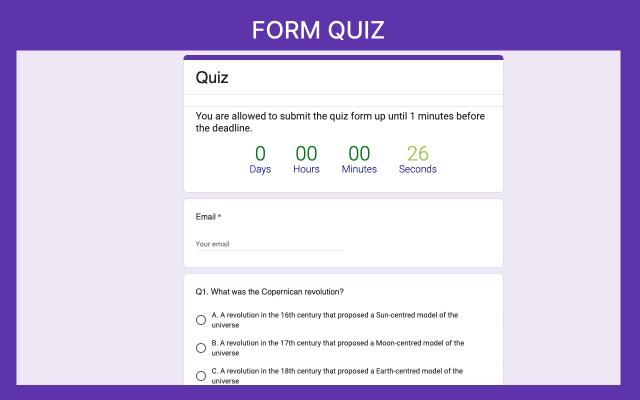
Use Form Quiz Timer when the form needs a clear time window
Use Form Quiz Timer for classroom quizzes, online exams, training assessments, surveys, attempt control, and flexible quiz-on-quiz practice.
Google Forms™ classroom quizzes
Give students a fixed quiz duration, such as 20 minutes, and close the form when the test window ends.
Timed online exams
Schedule the Google Forms™ quiz start time for online classes, remote exams, and controlled assessments.
Training assessments
Run timed employee tests, certification quizzes, and skills checks without manually opening or closing the form.
Time-limited Google Forms™ surveys
Collect time-sensitive survey responses during a selected window, then auto-close the Google Form™ at the end time.
Attempt control
Limit the number of attempts so respondents cannot keep retaking the same graded quiz.
Quiz on quiz learning
Support flexible quiz-on-quiz study formats by setting duration to 0 when timing is not needed.
Timer duration, schedule controls, attempts, messages, and QR sharing
Use the controls that matter most for a timed Google Forms™ workflow: duration, start time, end time, attempt limits, messages, QR code sharing, and automated start and stop.
Set quiz duration (timer in minutes)
Specify the duration in minutes for a timed quiz in Google Forms™. If duration is blank or 0, the quiz can run without a timer.
Schedule start time (auto open)
Auto open the Google Forms™ quiz at a specific time for online classes, exams, training, or survey windows.
Schedule end time (auto close)
Close a Google Form automatically at a selected time to prevent late submissions and manual follow-up.
Limit number of attempts
Limit repeat submissions and keep graded Google Forms™ quizzes or tests more controlled.
Custom open message
Show your own message before the quiz starts so students or respondents understand the available time.
Custom active and closed messages
Display clear active, finished, or closed messages at each stage of the quiz or survey.
QR code sharing
Share the Google Form by QR code so participants can scan and start quickly from class, events, or training rooms.
Automated start and stop
Your quiz opens and closes based on the schedule you choose, with less manual work during the test window.
Google Forms™ workflow
Use Form Quiz Timer inside your existing Google Forms™ quiz, Google survey form, or online test workflow.
A clearer start, timer, and closed-form experience for respondents
Preview the respondent experience so teachers, trainers, and teams can see how the timed quiz looks before installation.
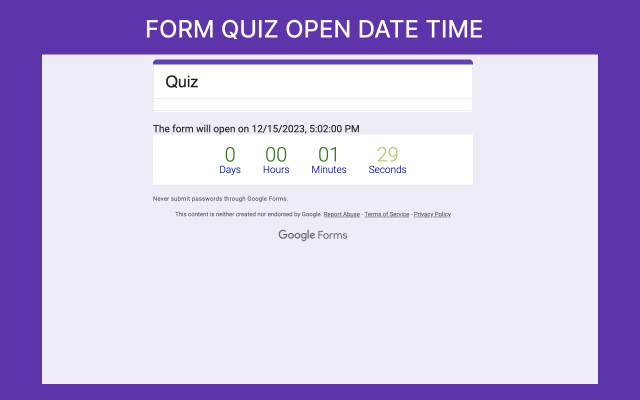
Before the quiz opens
Students or respondents can see the open time and countdown before the quiz starts.
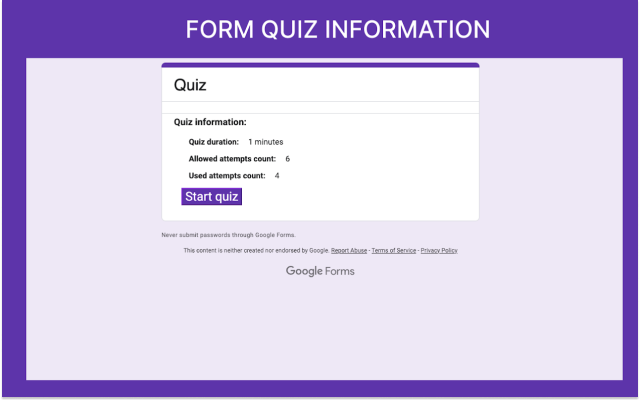
Quiz information screen
Participants see quiz duration and allowed attempts before they begin.
During the quiz
A visible timer helps participants track remaining time.
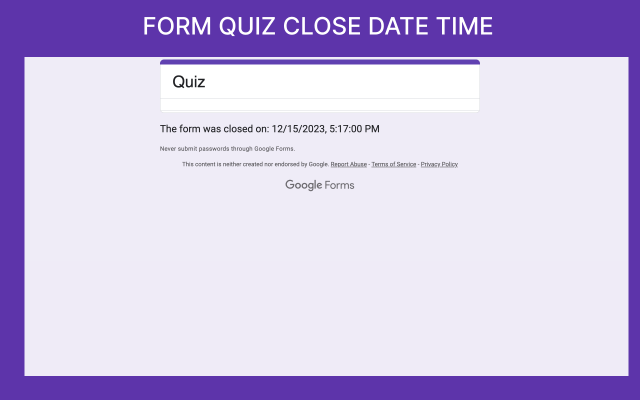
After the quiz closes
The form stops accepting responses automatically when the selected end condition is reached.
Install Form Quiz Timer, set timer duration, schedule access, and run your quiz
Start in Google Forms™, install the add-on, choose your timer settings, save the setup, and run the quiz.
Open your Google Form
Start from the Google Form™ that will become a timed quiz, online test, training assessment, or survey.
Click Extensions, then Add-ons
Use the Google Forms™ Extensions menu, choose Add-ons, and find Form Quiz Timer in Google Workspace Marketplace.
Install the add-on
Search and install Form Quiz Timer for Google Forms™ from the Marketplace listing.
Open settings
Open the add-on settings from the form and choose the quiz controls you need.
Set timer duration and start/stop schedule
Add the timer duration, start time, end time, attempts, and messages for the quiz or survey.
Save and run your quiz
Save the configuration, share the form or QR code, and let the add-on manage the test window.
Create timed quizzes in Google Forms™
Watch the Form Quiz Timer walkthrough for quiz duration, scheduling, attempt limits, participant messages, and controlled test windows.

Form Quiz Timer walkthrough
Learn how to create controlled Google Forms™ quizzes and exams with timer and scheduling features.
Common Form Quiz Timer questions
Answer the last practical questions before someone installs: surveys, no-timer scheduling, attempt limits, fixed duration, and QR access.
Install link, tutorial, policies, and related Google Workspace add-ons
Use these links to install the add-on, watch the tutorial, review policies, and explore related Google Workspace add-ons.
Download Form Quiz Timer
Install Form Quiz Timer for Google Forms™ from Google Workspace Marketplace.
How To Add Time Limit In Google Form Quiz
Watch the tutorial for adding a timer to a Google Forms™ quiz.
Terms and Conditions
Terms for Choice Eliminator for Google Forms™, Form Limit Timer, and Form Quiz Timer.
Privacy Policy
Privacy policy for Choice Eliminator for Google Forms™, Form Limit Timer, and Form Quiz Timer.
Form Limit Timer
Use another Everest Web Deals timer for start times, end times, and form limits.
Form Response Limit
Use when the whole Google Form™ needs a total response cap or start/stop schedule.
Troubleshooting & Setup
Instructions for properly setting up the form and troubleshooting common issues.
Our Other Google Workspace Add-ons
More details about using a Google Forms™ quiz timer
Learn how timer duration, scheduling, attempts, messages, QR sharing, and automatic closing work together.
Timed quizzes without manual checking
Form Quiz Timer helps you add a real timer, schedule start/end times, limit attempts, and auto-close the form so tests stay fair and surveys stay time-bound.
Use it to set a time limit for Google Forms™ quizzes, run online exams, collect time-sensitive survey responses, or schedule a form to open and close automatically.
The add-on supports quiz duration in minutes, scheduled activation, controlled availability, attempts limitation, customizable messages, QR code sharing, and automated start and stop timing.
Works for common Google Forms™ timer needs
Use Form Quiz Timer for Google Forms™, a Google Forms quiz timer, timed quiz in Google Forms™, online tests, online exams, Google survey form workflows, time-limited surveys, and quiz-on-quiz practice.
Use quiz duration, schedule start time, schedule end time, auto open, auto close, limit attempts, custom messages, QR code sharing, and automated start and stop controls as needed.
The same product name, Marketplace install route, tutorial route, FAQ topics, and related add-on paths remain available so returning users can still find the information they expect.
Ready to run timed quizzes and surveys?
Install Form Quiz Timer for Google Forms™, set the quiz duration, schedule the start and end time, limit attempts, and share the form by link or QR code.