
Form Limit Timer and Quiz Timer for Google Forms™
Form Limit Timer combines form scheduling, response caps, and individual quiz countdowns in one Google Forms™ add-on. Schedule opening and closing times, limit responses and attempts, enable optional auto-submit, and supervise online quizzes with ease.

Use Form Limit Timer for scheduled forms, response limits, and timed quizzes
Set open and close windows in Google Forms™, cap total responses, or give each respondent an individual countdown timer with attempt limits and optional auto-submit.
Appointment slots
Open a Google Form™ for a selected appointment window and stop accepting new responses after the deadline.
Event registration
Set a response limit so event registration closes automatically when capacity is reached.
Time-limited surveys
Collect survey responses during a fixed start and stop window without manually checking the form.
Timed quizzes & exams
Run classroom tests, online exams, and training assessments with individual countdown timers, attempt caps, and auto-submit.
Application deadlines
Close applications, sign-ups, and request forms by a selected date and time.
Response cleanup
Use Form Response Manager to search, view, edit, or delete responses after submissions arrive.
Timed quizzes, attempt limits, and session supervision for Google Forms™
Form Limit Timer gives you both form-level scheduling and individual quiz attempt controls. Set test durations with individual countdowns, cap participant attempts with retry cooldowns, enable optional auto-submit, and supervise assessment integrity.
Quiz duration in minutes
Give each respondent their own countdown timer that starts when they click “Start quiz”. The overall scheduled form closing time still applies.
Maximum attempts & retry delay
Limit allowed attempts per student or respondent and configure a mandatory waiting period before re-taking. Started and unfinished attempts count.
Optional auto-submit on timeout
Automatically submit answers when the individual attempt timer or the scheduled closing deadline expires, whichever comes first.
Session controls & proctoring
Prompt for fullscreen mode in supported browsers, record tab switching, and block copy, cut, and paste actions on the quiz page.
Google sign-in & domain restriction
Require Google authentication and restrict quiz access to trusted school or organization email domains to enforce cross-device attempt limits.
Attempt history dashboard
Review comprehensive quiz attempt records in the add-on Dashboard, including start/end timestamps, elapsed duration, and logged session activity.
Respondents must use the generated Form Limit Timer link (https://formlimit.everestwebdeals.co/?form=...) or its QR code rather than the raw Google Forms URL. The add-on uses this hosted responder page to control timing, access, and supervision. For multi-section forms using auto-submit, put required questions in the first section and keep subsequent sections optional so unanswered required questions do not block submission when time runs out. Learn more about setup rules →
Start and stop dates, quiz timers, response limits, custom messages, QR codes, and response manager
Control the full Google Forms™ workflow with scheduled availability, individual quiz attempt timers, response limits, custom open/active/close messages, QR sharing, and Form Response Manager.
Set start date and time
Choose when the Google Form™ becomes active so respondents cannot start before the selected time.
Set disable end date and time
Close the form automatically after a deadline, event window, survey period, or appointment slot.
Show timer on the form
Display a timer so respondents can see the remaining form availability window.
Set quiz duration in minutes
Individual countdown begins when the respondent clicks Start quiz, while the overall scheduled closing time still applies.
Maximum attempts & retry delay
Set attempt limits per person and enforce a waiting period before another attempt. Started and unfinished attempts count toward the limit.
Session controls & auto-submit
Request fullscreen in supported browsers, record tab switching, block copy/paste on the quiz page, and enable optional auto-submit upon expiry.
Limit number of responses
Set the maximum responses your Google Form™ can accept before the form closes.
Form Response Manager
Search, view, edit, or delete responses from the add-on workflow when response management is needed.
Custom Form Limit Timer URL
Use the Form Limit Timer preview URL when the add-on controls timing and limits for respondents.
Custom open form message
Show a message before the form opens so respondents understand when access begins.
Custom active and close messages
Set active and closed form messages for each stage of the Google Forms™ workflow.
Share the form via QR code
Let respondents scan a QR code to reach the controlled form URL from posters, classrooms, and events.
Form scheduling, timed quiz screens, and response management
Preview the participant quiz experience, countdown timers, attempt warning screens, timer settings, and response management before you install the add-on.
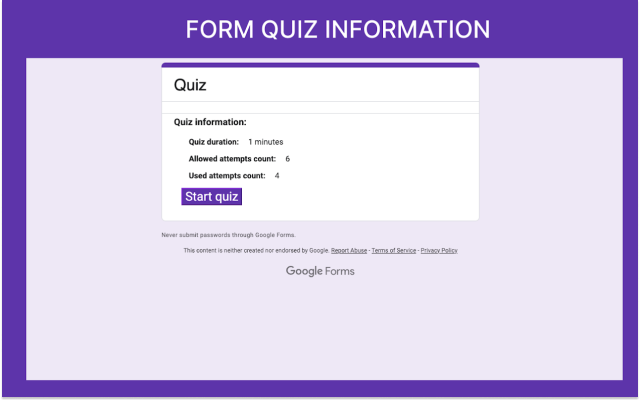
Quiz info & attempts
Display quiz duration, allowed attempts, used attempts, and custom start button.
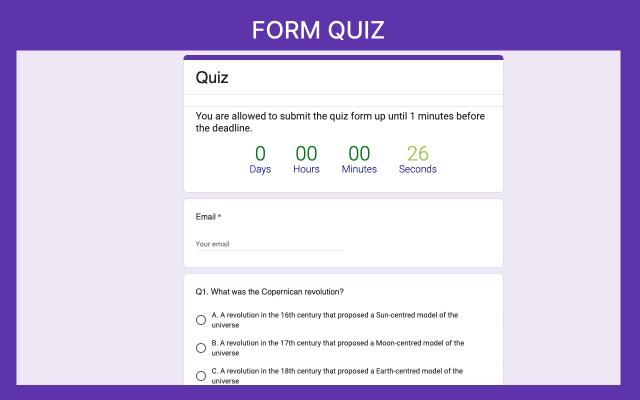
Timed quiz countdown
Give respondents a live attempt timer and countdown warnings as they complete the quiz.
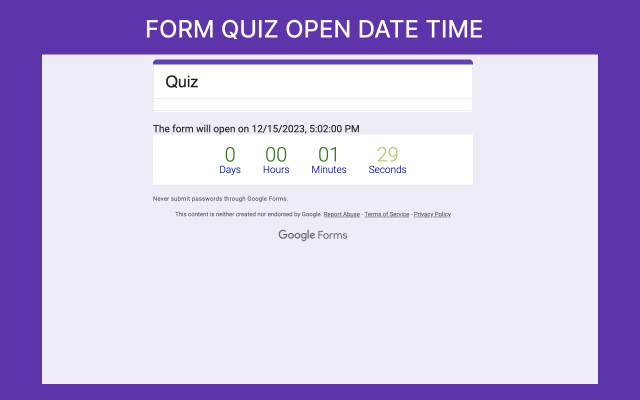
Before quiz opens
Show a live countdown to the scheduled quiz opening date and time with a custom message.
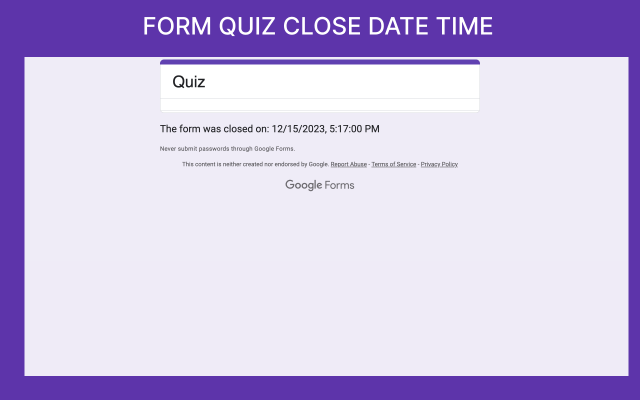
Auto-closed quiz screen
Display a custom closing message when participant time or the scheduled deadline ends.

Active form message
Show a clear active message while the Google Form™ is available.

Closed form message
Display a custom close message after the form reaches the end date, time, or response limit.

Add timer settings
Configure the form availability rules and save the setup for respondents.
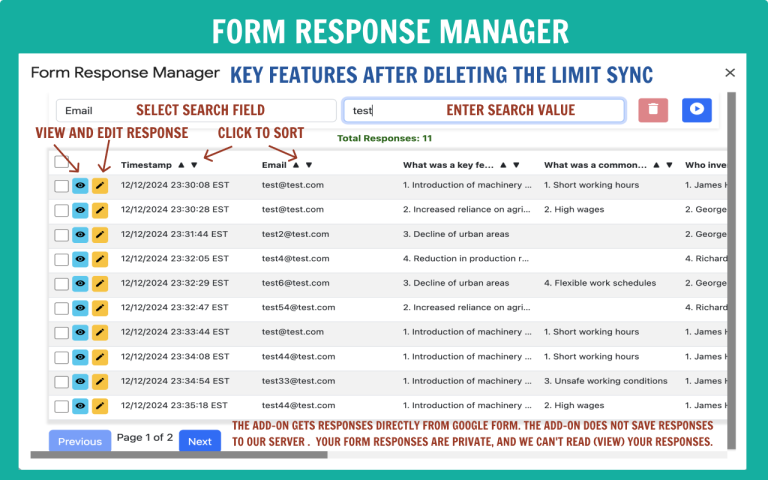
Response manager
Review and manage submitted responses from the Form Limit Timer workflow.
Install Form Limit Timer, configure scheduling or quiz mode, and share the controlled form
Follow these simple steps in Google Forms™ to schedule open/close times, cap responses, or run timed quizzes with attempt limits and auto-submit.
Open your Google Form
Open the form or quiz that needs scheduled opening, a response cap, an appointment deadline, or a timed test window.
Install the add-on
Install Form Limit Timer from the Google Workspace Marketplace listing and grant standard form permissions.
Open add-on settings
In Google Forms™, click the puzzle-piece add-on menu, choose Form Limit Timer, and click Configure.
Set schedule & response limit
Choose your start date/time, disable end date/time, and maximum response cap. Add custom open, active, and closed messages.
Configure quiz timer & session controls
For quizzes, set Quiz Duration in minutes, Maximum attempts, retry waiting period, optional auto-submit, and trusted domain restrictions.
Test & share responder link
Test a complete attempt through the generated Form Limit Timer link or QR code before sharing with respondents.
Form timing and response management tutorials
Learn Form Limit Timer setup first, then see how respondents can update an existing Google Forms™ submission without creating duplicate records.

Form Limit Timer walkthrough
Learn how to control Google Forms™ with countdown timing, scheduling, and response-limit features.

Let users update responses
Show respondents how to update an existing submission without creating duplicate response records.
Common Form Limit Timer & Quiz questions
Quick answers about timing, timed quizzes, attempt caps, auto-submit, session supervision, response limits, and QR sharing.
https://formlimit.everestwebdeals.co/?form=...) or its QR code rather than the standard Google Forms URL. The add-on uses this secure hosted responder page to manage countdown timing, attempt limits, session controls, and auto-submit.Install link, instructions, response manager, policies, and related Google Workspace add-ons
Use these links to install the add-on, follow the setup guide, review response management, and open the privacy or terms pages.
Download Form Limit Timer
Install Form Limit Timer for Google Forms™ from Google Workspace Marketplace.
How to set time limits in Google Forms™
Follow the setup guide for Form Limit Timer.
Response Manager: update responses
Watch how respondents can update an existing form submission.
How to edit responses in Google Forms?
Learn how response editing works for Google Forms™ workflows.
Form Limit Timer Privacy Policy
Review privacy information for this add-on.
Terms and Conditions for Form Limit Timer
Review product terms and conditions.
Troubleshooting & Setup
Instructions for properly setting up the form and troubleshooting common issues.
Our Other Google Workspace Add-ons
More details about using a Google Forms™ timer with response limits and timed quizzes
Learn how Form Limit Timer supports Google Forms™ scheduling, response caps, per-attempt quiz timers, and session controls.
Form availability & timed quiz execution
Form Limit Timer for Google Forms™ gives you precision over form timings, including exact start times, end times, response-count limits, and per-attempt quiz countdowns.
Use it for classroom tests, online exams, employee training assessments, appointment slots, event planning, registration forms, and time-limited surveys.
For quizzes, specify a Quiz Duration in minutes. When participants begin, an individual countdown timer tracks their remaining time. If an overall scheduled form closing date is also set, whichever deadline ends first applies, ensuring tests wrap up promptly.
Enable optional auto-submit upon timer expiration. For multi-section forms, place required questions in the first section and keep later sections optional to ensure automated submission succeeds even if students haven't navigated through every page.
Session supervision, attempt limits & response control
Combine Google Forms™ start/stop controls with attempt limits, retry cooldown periods, proctoring tools, and Form Response Manager.
Enforce fair testing conditions by prompting for fullscreen mode in supported browsers, logging tab switches, and disabling copy, cut, and paste on the quiz page. Require Google sign-in to prevent participants from circumventing attempt limits across devices, or restrict access to trusted institutional email domains.
Manage responses effortlessly with Response Manager: search, view, edit, or delete submitted records, re-sync response counts, or share the controlled form link and QR code in classrooms or online platforms.
Ready to control Google Form timing, response limits, and timed quizzes?
Install Form Limit Timer for Google Forms™, schedule open and close times, cap submissions, run timed quizzes with attempt limits and auto-submit, and share via link or QR code.