
Form Response Limit for Google Forms™
Use Form Response Limit, Form Limiter, and FormLimiter to limit the number of responses in your Google Form™. Set response caps, start and stop dates, email notifications, and a custom closed form message so Google Form Response and Form Start/Stop workflows are easier to manage.
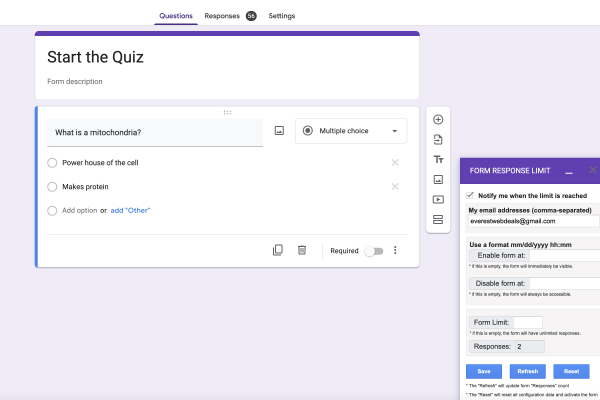
Use Form Response Limit when the whole form needs a response cap or schedule
This Google Forms™ add-on is useful when you need to limit Google Form responses, close a form automatically, or set start and stop dates for accepting submissions.
Events, surveys, and time-sensitive forms
This Google Forms™ add-on lets you add limits to the total number of responses your Google Form™ can receive. Use it for event registration, surveys, appointment forms, deadlines, and start or stop form access without manually watching submissions.
Form Response Limit is a powerful tool that can help you manage your Google Forms more efficiently. It allows you to set limits on your form responses, so you can control the number of responses you receive.
This is particularly useful for events, surveys, and other time-sensitive projects where you need to manage the number of responses you receive.
With Form Limiter, you can also set a start and stop time for your form. This means that your form will only be available during a specific time frame, so you can control when responses are accepted.
FormLimiter is easy to use and can be installed as an add-on to your Google Forms. Once installed, you can set your response limits and start/stop times with just a few clicks.
In conclusion, if you are looking for a way to manage your Google Forms more efficiently, Form Limiter is the perfect solution.
Feature checklist
Google Form Response, Form Limiter, and Form Start/Stop help set a form limit, response form limit, start and stop dates, email notifications, response manager tools, QR code sharing, and a custom closed form message.
Form Limit, FormLimiter, form limiter. LIMIT GOOGLE FORM RESPONSES. EMAIL NOTIFICATIONS. START/STOP DATES. CLOSE FORM BY DATE. RESPONSES MANAGER.
Form Response Limiter enables you to set a form limit on the number of responses to your form, set start and stop dates, and control when the form accepts submissions.
Receive Emails when the form limit is reached and use the Response Manager to search, view, edit, or delete responses as needed.
- FormLimiter, Limit the number of responses in your Google Form™. Limit the number of responses your Google Forms™ can receive. Close the Google Form™ automatically by date and time.
- Receive Emails when the limit is reached.
- Set a start date and time for your form when the form is active.
- Set a disable (end) date and time to your form to no longer be available.
- Response Manager: You can control all responses; you can search, view, edit, and delete them. Form Response Manager: search, view, edit, or delete them as needed.
- FORM QR CODE. Generate a QR Code for your form to share with respondents. QR Code for Form Link.
- CUSTOM CLOSED FORM MESSAGE. Set a custom closed form message to display when the form is no longer accepting responses. Custom Closed Form Message.
Close Google Forms™ by response count, date, or time
Form Response Limit helps manage events, surveys, waitlists, sign-ups, and time-sensitive Google Forms™ where the full form needs a clear response cap or schedule.
Event registration
Set a maximum number of responses so registration can close automatically when capacity is reached.
Surveys
Collect a fixed number of survey responses and stop accepting new submissions after the limit.
Time-limited forms
Set start and stop dates so a form is active only during the window you choose.
Response cleanup
Use Response Manager to search, view, edit, and delete responses from one add-on workflow.
Response limits, start and stop dates, alerts, QR code, and response manager
Limit total Google Forms™ responses and control when the form accepts submissions with response caps, start dates, stop dates, alerts, and response management.
Set response limit
Set a maximum number of responses for your Google Form™, and close the form automatically when the limit is reached.
Close form by response count
Stop new submissions after the response count reaches your selected cap.
Email notifications
Receive emails when the limit is reached, so you know the form has stopped accepting responses.
Start date and time
Set a start date and time for your form when the form should become active.
Disable end date and time
Set a disable end date and time so your form is no longer available after the deadline.
Custom closed form message
Set a custom closed form message to display when the form is no longer accepting responses.
Response Manager
Control responses from the add-on. Search, view, edit, and delete all responses when needed.
Form QR code
Generate a QR Code for your form to share with respondents on printed or digital materials.
Google Forms™ sharing
Keep the form easy to share while the add-on controls limits, schedules, and the closed form message.
Install, set a response limit, schedule availability, and monitor responses
Install the add-on, choose your response cap, set the form start and stop window, then manage responses as they arrive.
Install
Open Google Workspace Marketplace from Google Forms™ and install Form Response Limit.
Set response limit
Add the maximum number of responses your form should accept before it closes.
Schedule dates
Set the start date, stop date, and disable time for a controlled Form Start/Stop workflow.
Save and monitor
Save the configuration and receive email notifications when the limit is reached.
Manage responses
Search, view, edit, delete, or share the form by QR code when your campaign is active.
Learn Form Response Limit and response editing
Start with the Form Response Limit overview, then learn how respondents can update an existing Google Forms™ submission.

Form Response Limit overview
Learn how to limit total form responses and control when a Google Form accepts submissions.

Let users update responses
Show respondents how to update an existing submission without creating duplicate response records.
Install links, instructions, policy pages, and related Google add-ons
Use these links to install the add-on, follow tutorials, review policies, manage responses, and explore related Google Forms™ tools.
Download Form Response Limit
Install from Google Workspace Marketplace.
How to install the Form Response add-on
Step-by-step setup guide for Google Forms™.
How to Edit Responses in Google Forms?
Learn how to review and manage form responses.
How to Set Response Limits in Google Forms™
Guide for setting response caps in Google Forms™.
Form Response Limit Privacy Policy
Review privacy information for this add-on.
Terms and Conditions for Form Response Limit
Review the product terms and conditions.
Form Choice Limiter
Use when each answer option needs its own response limit.
Form Field Limit
Explore another Google Forms™ limiter add-on.
Our Other Google workspace Add-ons
Frequently Answered Questions
Quick answers help you decide whether Form Response Limit is the right add-on before you install it.