
Color-coded task lists
Count open, urgent, finished, or blocked work when each status already has a background color.
Function By Color helps you calculate colored cells in Google Sheets™ by background fill color or text color. Use it to count, sum, average, find min and max, count blank cells, and summarize color-coded spreadsheet data without manual checking.
Start with the problems spreadsheet users recognize first: color-coded tasks, grading, sales tracking, inventory, finance notes, and quick summaries from existing visual labels.
Count open, urgent, finished, or blocked work when each status already has a background color.
Summarize color-coded responses, scores, or review states without manually counting each cell.
Total sales, count items, or find missing information by the colors used in your spreadsheet.
Calculate totals for donations, expenses, categories, or review stages marked with fill colors.
Use background color or font color to group priorities, then return counts, sums, or averages.
Count blank cells in a selected color group when missing entries matter for cleanup or review.
Function By Color supports the common spreadsheet calculations users look for when they ask how to count colored cells in Google Sheets or sum cells by color.
Add numeric values from cells that match the selected background fill color or text color.
Average numeric values from one color group instead of building manual helper columns.
Multiply numeric values for a selected color group when your spreadsheet uses color as a category.
Count numeric cells matching the selected fill color or font color.
Count text cells in a color group when you need totals for labels, names, notes, or statuses.
Find empty cells that still belong to a selected background or text-color group.
Find the smallest or largest value inside a matching color group.
Summarize the common or middle value for cells that share the same visual category.
Use statistical functions for numeric color groups when the sheet needs deeper analysis.
Follow the workflow for choosing a color, selecting a calculation, and applying Function By Color in Google Sheets™.
Install Function By Color from Google Workspace Marketplace, then open the spreadsheet you want to analyze.
Click Extensions, choose Function by Color, and click Start to open the Google Sheets™ sidebar.
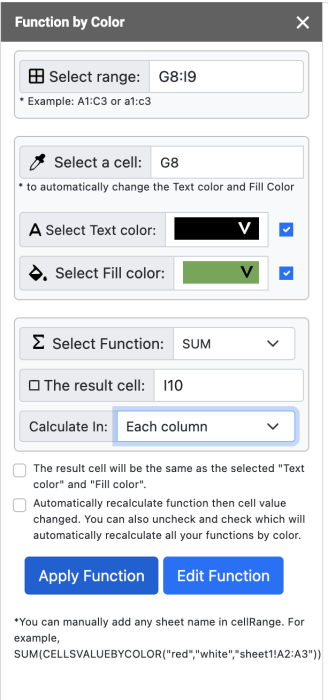
Use the Select Range input to add the cells you want to calculate, such as C3:C12.
Select a cell so the sidebar can detect the text color and fill color, or choose those colors manually.
Choose SUM, COUNT, COUNTA, COUNTBLANK, AVERAGE, MIN, MAX, PRODUCT, MODE, STDEV, VAR, or MEDIAN.
Choose the result cell, decide whether to match the result cell color, set Calculate In, and click Apply Function.
Watch the main Function By Color workflows for calculating colored cells by background fill or text color.
 Watch
Watch
See the quick workflow for totaling values that share the same background or text color.
 Watch
Watch
Follow the detailed Function By Color workflow for selecting colors, ranges, and calculation functions.
 Watch
Watch
Learn how to calculate totals for color-coded spreadsheet data without writing a custom script.
Function By Color supports a sidebar workflow and a custom function for grouped color summaries.
The sidebar can insert formulas for matching fill color and text color in the selected range.
=SUM(CELLSVALUEBYCOLOR("#4a86e8", "#0c343d", "C3:C12"))
CELLSBYCOLOR can return a color-by-value summary for each matching font color group.
=CELLSBYCOLOR("A2:D40", "font", "AVERAGE")
Use background mode when the fill color is the visual category for the sheet.
=CELLSBYCOLOR("A2:D40", "background", "SUM")
The output can become a quick summary table for color-coded spreadsheet analysis.
background or font + SUM, COUNT, AVERAGE, MIN, MAX, and more
Preview Function By Color screens before you open the Google Workspace Marketplace listing.
Select the range, target color, calculation function, result cell, and Calculate In setting.

Use color-matched formulas to return totals, counts, averages, and other summaries in Google Sheets™.
Quick answers about background color, font color, counting, formulas, and supported calculations.
Use these links to install the add-on, review support resources, and explore related Google Workspace tools.
Install Function By Color from Google Workspace Marketplace.
Open the Everest Web Deals subscription page for Function By Color.
Review the privacy policy for Everest Web Deals Google add-ons.
Review the terms for Everest Web Deals Google add-ons.
Learn how Function By Color, CELLSBYCOLOR, and Google Sheets color calculations help you work with colored cells.
Function by color Google app calculates the sum, count, max, min, average, and other colored cells with the same background and text color.
Use it when your Google Sheets™ data already uses colors for priorities, categories, statuses, grades, inventory groups, or financial review states.
The add-on helps identify matching background fill colors and text colors, then applies spreadsheet functions to the selected cell range.
Use Function By Color, the Function by color Google add-on for Google Sheets™, to count colored cells in Google Sheets and answer common color-calculation questions.
Extra related phrases were added where they fit naturally: Google Sheets count colored cells, sum by color Google Sheets, count by background color, count by font color, CELLSBYCOLOR, CELLSVALUEBYCOLOR, background fill color, and text color.
Install from Google Workspace Marketplace, follow the tutorial steps, review function examples, and explore related add-ons whenever you need them.
Install Function By Color, select your range, choose background fill color or text color, pick a function, and apply the result to your spreadsheet.