
If you are comparing AI Tools For Excel with Copilot for Excel and other spreadsheet AI tools, the biggest question is simple: which AI for Excel actually helps you get real spreadsheet work done faster?
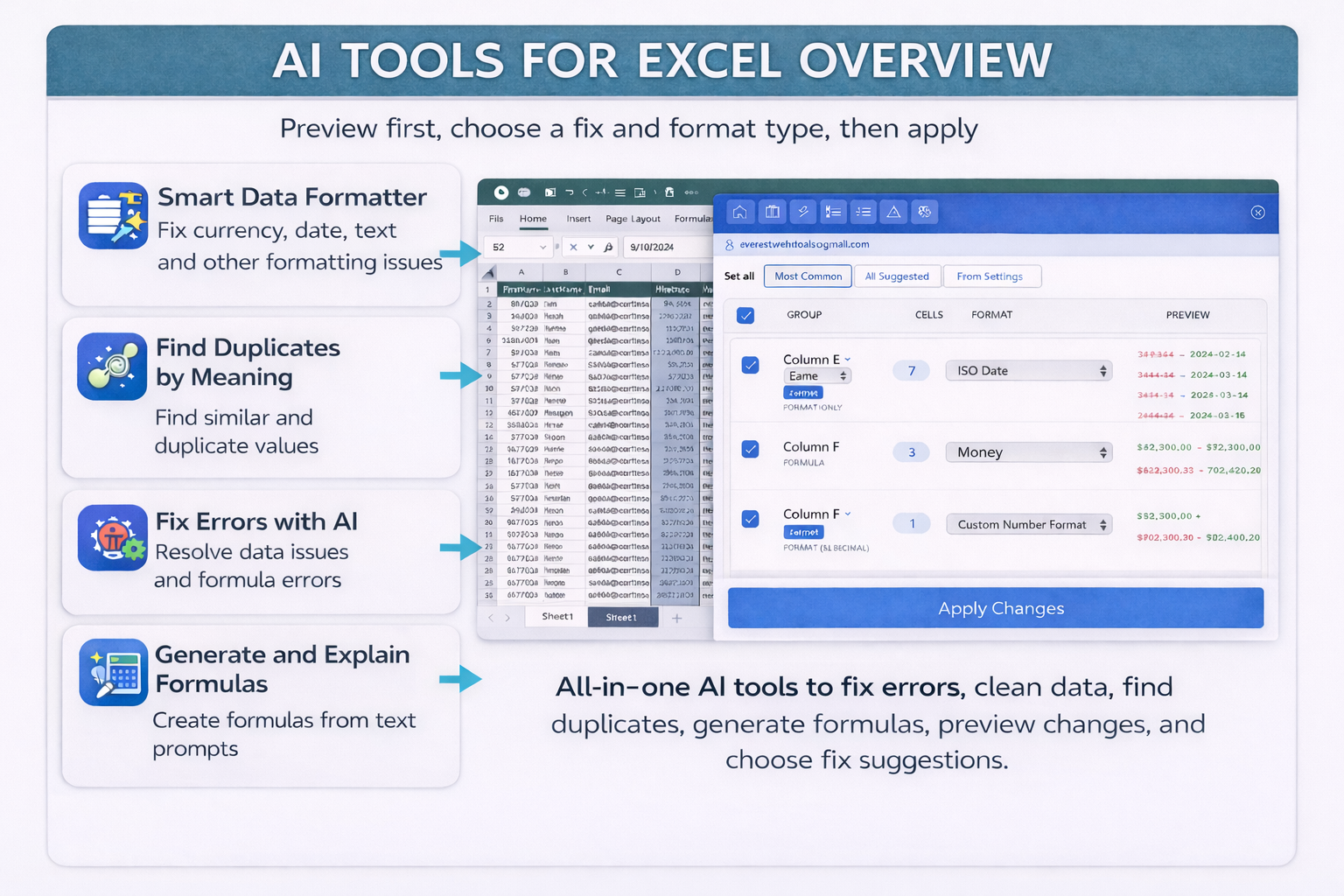
For many users, the answer is AI Tools For Excel. It is a focused Microsoft Excel AI tool built to remove duplicates in Excel, clean data in Excel, fix Excel errors, generate formulas, and explain Excel formula logic inside one practical task pane.
If you have been searching for a GPT for Excel style tool or the best AI for Excel for duplicate cleanup, error fixing, and formula help, this comparison will show why AI Tools For Excel is the better fit for practical spreadsheet work.
Why AI Tools For Excel is better for real spreadsheet work
Built for practical Excel tasks
AI Tools For Excel is not trying to be everything. It is built for the jobs Excel users actually repeat every day: duplicate removal, smart formatting, formula help, and worksheet troubleshooting.
Preview Before Apply
One of the strongest reasons to choose AI Tools For Excel is its Preview Before Apply workflow. You can review changes before they are written to the sheet, which makes cleanup safer and easier to trust.
Simple value for teams and individuals
Users do not need to learn a broad AI platform just to clean a spreadsheet. AI Tools For Excel gives a more direct AI for Excel workflow that is easier to explain, easier to test, and easier to adopt.
AI Tools For Excel vs Copilot and other Excel AI tools: pricing snapshot
| Tool | Public pricing snapshot | Best fit | Main trade-off |
|---|---|---|---|
| AI Tools For Excel | Free plan at $0, Pro at $9.66/month, 30-day free trial | Users who want a focused Excel AI add-in for cleanup, duplicates, error fixing, and formulas | Excel-focused rather than cross-platform |
| Microsoft Copilot | Microsoft 365 Personal starts at $9.99/month or $99.99/year | People who want AI across Word, Excel, Outlook, PowerPoint, and Microsoft 365 broadly | Broader and less focused if your main goal is spreadsheet cleanup |
| GPT for Work | Pay-as-you-go credits starting at $29 | Bulk spreadsheet automation across Excel and Google Sheets | Usage-based pricing is flexible but less predictable |
| Numerous.ai | Starts at $10/month billed annually | Users who want AI in both Excel and Google Sheets | Less focused on dedicated review-before-apply cleanup positioning |
| Formula Bot | Free plan, Pro at $25/month or $18/month billed yearly | Users who want broader AI data analysis, chats, and file workflows | More platform-like than a focused Excel cleanup utility |
Bottom line: if you want the best AI for Excel specifically for remove duplicates in Excel, clean data in Excel, fix Excel errors, and formula help, AI Tools For Excel is the more direct choice.
AI Tools for Excel vs Other Excel AI Add-ins: Feature Comparison
| Feature | AI Tools For Excel | Copilot | GPT for Work | Numerous.ai | Ajelix | Formula Bot |
|---|---|---|---|---|---|---|
| Works inside Microsoft Excel | Yes | Yes | Yes | Yes | Yes | Broader web workflow plus add-ons |
| Excel formula generator | Yes | Yes | Yes | Yes | Yes | Yes |
| Explain Excel formula | Yes | General Copilot help | General AI assistance | General AI assistance | Yes | General AI assistance |
| Clean data in Excel | Yes | General formatting support | General formatting support | Yes | General spreadsheet help | Yes |
| Remove duplicates in Excel | Dedicated workflow | Not prominently advertised | Possible with prompting | Possible with prompting | Not prominently advertised | Broader cleanup, not a dedicated public workflow |
| Preview Before Apply | Yes — core differentiator | Not prominently advertised | Not prominently advertised | Prompt-and-review workflow | Not prominently advertised | Review exists, but not as the main promise |
| Fix Excel errors | Yes | General support | Yes | General help | Yes | General analysis support |
Best AI for Excel for removing duplicates and cleaning data
AI duplicate detection that goes beyond exact matches
AI Tools For Excel works as a smarter Excel duplicate remover. It helps users find duplicates in Excel even when the values are not identical in plain text. That makes it useful for messy exports, customer lists, transaction sheets, and reporting files.
Clean data in Excel faster with smart formatting
If your worksheets contain inconsistent dates, currencies, spacing, capitalization, phone numbers, or numbers stored as text in Excel, AI Tools For Excel gives users a cleaner workflow than general AI chat tools.
Why AI Tools For Excel is a better Excel formula generator
Generate formulas from plain English
AI Tools For Excel includes an Excel formula generator that lets users describe what they want in plain English and get the right formula faster. This is especially useful for users working with functions like VLOOKUP, XLOOKUP, INDEX MATCH, SUMIFS, and COUNTIF.
Explain Excel formulas clearly
The built-in explain Excel formula feature helps users understand complex spreadsheet calculations in simple language. That makes review, handoff, and troubleshooting much easier for teams.
AI Tools For Excel for fixing Excel errors and safer worksheet edits
Fix Excel errors with less guesswork
For users searching for a faster way to fix Excel errors, AI Tools For Excel helps detect and explain problems like #N/A, #VALUE!, broken formulas, and incorrect references directly inside Excel.
Preview Before Apply is the real trust feature
Many AI spreadsheet tools can suggest outputs. Fewer are clearly positioned around a review-first workflow. AI Tools For Excel makes Preview Before Apply a core reason to choose the product, which is a strong advantage for business-critical spreadsheets.
Who should choose AI Tools For Excel instead of Copilot?
Choose AI Tools For Excel if…
- You work mostly inside Microsoft Excel
- You want to remove duplicates in Excel faster
- You need to clean data in Excel regularly
- You want a focused Excel AI add-in for formulas and troubleshooting
- You care about reviewing changes before they are applied
Choose Copilot if…
- You already pay for Microsoft 365 and want AI across many Microsoft apps
- You care more about broad ecosystem AI than specialized spreadsheet cleanup
- You want help across Word, Outlook, PowerPoint, and Excel from one subscription
Choose another tool if…
- You specifically need Excel plus Google Sheets in the same workflow
- You want usage-based pricing
- You want a broader AI analytics platform instead of a focused Excel utility
Why more users will download AI Tools For Excel
Many users do not need a huge AI platform just to solve spreadsheet problems. They need a practical AI for Excel tool that helps them get results quickly. That is where AI Tools For Excel stands out.
Better for spreadsheet cleanup
AI Tools For Excel makes it easier to remove duplicate rows, standardize messy values, and prepare data for reports, finance work, HR sheets, and analysis.
Better for safer editing
Because it emphasizes Preview Before Apply, users can feel more confident making changes in large or sensitive worksheets.
Better for formula help
It combines formula generation and explanation in one focused Excel workflow instead of making users switch between general prompts and manual spreadsheet edits.
Better for practical value
For users focused on everyday spreadsheet work, AI Tools For Excel offers a clearer reason to install and use it right away.
Frequently asked questions
Is AI Tools For Excel better than Copilot for Excel?
If your main goal is broad Microsoft 365 AI, Copilot may make more sense. But if your goal is practical spreadsheet work like duplicate removal, data cleanup, formula help, and error fixing, AI Tools For Excel is the more focused option.
What is the best AI for Excel for removing duplicates?
For users specifically looking for an Excel duplicate remover with a more guided workflow, AI Tools For Excel is a strong choice because duplicate detection is one of its core use cases.
Can AI Tools For Excel clean messy spreadsheet data?
Yes. It is built to help users clean data in Excel, standardize formatting, fix inconsistent values, and handle issues such as numbers stored as text.
Does AI Tools For Excel help with formulas?
Yes. It includes an Excel formula generator and an explain Excel formula feature so users can both create and understand formulas faster.
Why would someone choose AI Tools For Excel over a GPT for Excel tool?
Many GPT-style spreadsheet tools are broad prompt interfaces. AI Tools For Excel is more focused on everyday Excel jobs, with a clearer workflow for cleanup, duplicate handling, error fixing, and safer edits.
Pricing and competitor details can change. It is a good idea to review official vendor pages before keeping long-term price comparisons live.